Coming soon โ€” join the waitlist

Stop studying alone.

Peanut is a desktop app where an animated buddy lives on your screen while you study โ€” with shared timers, group rooms, and friends studying right alongside you in real time.

Free forever for early supporters. No credit card needed.

๐Ÿง‘โ€๐ŸŽ“
๐Ÿ‘ฉโ€๐Ÿ’ป
๐Ÿง‘โ€๐Ÿ”ฌ
๐Ÿ‘จโ€๐ŸŽจ
7,000+ students on the waitlist
Drag Peanut!
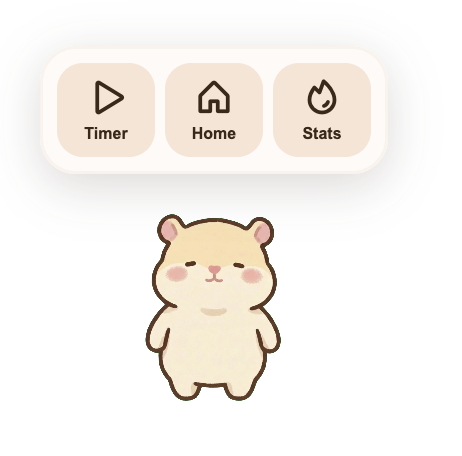
Peanut widget on desktop
Resting
Peanut widget expanded
Studying
The #1 thing that makes Peanut different

It lives on your actual screen

Peanut isn't a tab you switch to โ€” it floats right on top of your Google Docs, notes, or PDFs. Your study buddy is always there, cheering you on without interrupting your flow.

  • Floats above all your other apps
  • Resize it small when you need focus, bigger when you want to see your crew
  • No alt-tab needed โ€” your timer and friends are always visible
Collectible characters

Meet your study crew

Earn acorns every time you study and unlock new buddies. The more you study, the more friends you collect.

Peanut

Your starter buddy

๐ŸŒฐ Free

Quackers

The focus duck

๐ŸŒฐ Unlock with acorns

Biscuit

The loyal pup

๐ŸŒฐ Unlock with acorns

Truffles

The rare one

๐ŸŒฐ Unlock with acorns

Earn acorns by completing study sessions. The longer you study, the more you unlock.

Peanut is for you if...

You study alone more than you'd like
You wish you had a study buddy but your friends are always busy
You've tried Pomodoro apps and found them boring
You love cute things and cozy vibes
You want motivation that feels like a warm hug, not a drill sergeant
You're a student who wants to do well but needs a little extra push
Your progress, beautifully tracked

Watch your habits come to life

Every session builds your study heatmap โ€” a satisfying record of the work you've put in. See your hours, streaks, and consistency at a glance.


  • Heatmap calendar shows your study history
  • Total hours tracked across all sessions
  • Compare streaks with friends and stay motivated
Peanut study stats and heatmap
PeanutStudy

Ready to stop studying alone?

Download PeanutStudy for free and bring your study crew together.

Free download ยท macOS & Windows ยท No account needed

Be one of the first to try Peanut

Get free early access + exclusive stickers when we launch. Only sharing with our first 1000 supporters.

We'll never share your email. Unsubscribe anytime.

You're in!

We'll let you know the moment Peanut is ready.

In the meantime, tell a friend โ€” studying together is the whole point.

Downloading PeanutStudy...

Important! Opening PeanutStudy on Mac

macOS will block it on first open โ€” totally normal, just follow these 3 steps.

1

Open PeanutStudy

macOS blocks it and shows this popup:

"PeanutStudy" cannot be opened

Apple cannot check it for malicious software.

Move to Trash
OK
2

System Settings โ†’ Privacy & Security

Scroll to Security, click Open Anyway:

System Settings
Wi-Fi
Privacy & Security
Notifications
Security
"PeanutStudy" was blocked.
Open Anyway

Available ~1 hour after first open attempt.

3

Enter password โ†’ OK

Type your Mac login password and click OK:

Touch ID or Enter Password

โ€ขโ€ขโ€ขโ€ขโ€ขโ€ขโ€ขโ€ข
Cancel
OK

You're in! PeanutStudy will open.

Why is PeanutStudy safe?

  • โ€ข This warning shows for all indie Mac apps not on the App Store โ€” totally normal.
  • โ€ข PeanutStudy is a study timer โ€” only tracks focus sessions & connects you with friends.
  • โ€ข Does not access your files, camera, mic, or personal data.
  • โ€ข 7,000+ students trust us. Built by students, for students.

Important! Opening PeanutStudy on Windows

Windows SmartScreen will block it on first open โ€” totally normal, just follow these 3 steps.

1

Run the installer

Windows blocks it and shows this popup:

Windows protected your PC

Microsoft Defender SmartScreen prevented an unrecognized app from starting.

Don't run
2

Click "More info"

Tap More info to reveal the Run anyway button:

Windows protected your PC

App: PeanutStudy.exe
Publisher: Unknown Publisher

More info
Don't run
3

Click "Run anyway"

Click Run anyway to install PeanutStudy:

Windows protected your PC

App: PeanutStudy.exe
Publisher: Unknown Publisher

Don't run
Run anyway

You're in! PeanutStudy will install.

Why is PeanutStudy safe?

  • โ€ข This warning shows for all indie Windows apps not in the Microsoft Store โ€” totally normal.
  • โ€ข PeanutStudy is a study timer โ€” only tracks focus sessions & connects you with friends.
  • โ€ข Does not access your files, camera, mic, or personal data.
  • โ€ข 7,000+ students trust us. Built by students, for students.
Will be launched soon โ€” stay tuned!